Opus Group Insights
Google Ads for Plumbers: The 2026 Search Ads Playbook
Want this worked out for your numbers? Free 15-min check → or call +1 (256) 516-9910
Summary: Google Ads for plumbers is most useful when you buy specific searches, such as burst pipes, drains, water heaters and repipes, and give each its own ad and landing page. Across the accounts Opus Group runs, leads have averaged $63 over the last twelve months, and close rates are best measured from your own job records. Judge each campaign on cost per booked job, and run ads only while someone can answer. In one plumbing account we run, $14.1K of ads brought 237 calls and forms in a month, about $60 each.
Google Ads works for plumbers when you pay only for the searches that turn into the jobs you want, such as burst pipe repair, drain cleaning and water heater replacement, send each one to a page built for that job, and pause the ads when nobody can answer. Start with Local Services Ads for "plumber near me" searches, add Search campaigns for your best-paying jobs, and judge every campaign on cost per booked job, not cost per click. Plumbing jobs start from different searches, and Search ads let you pick which ones to pay for.
What this looks like in a real account
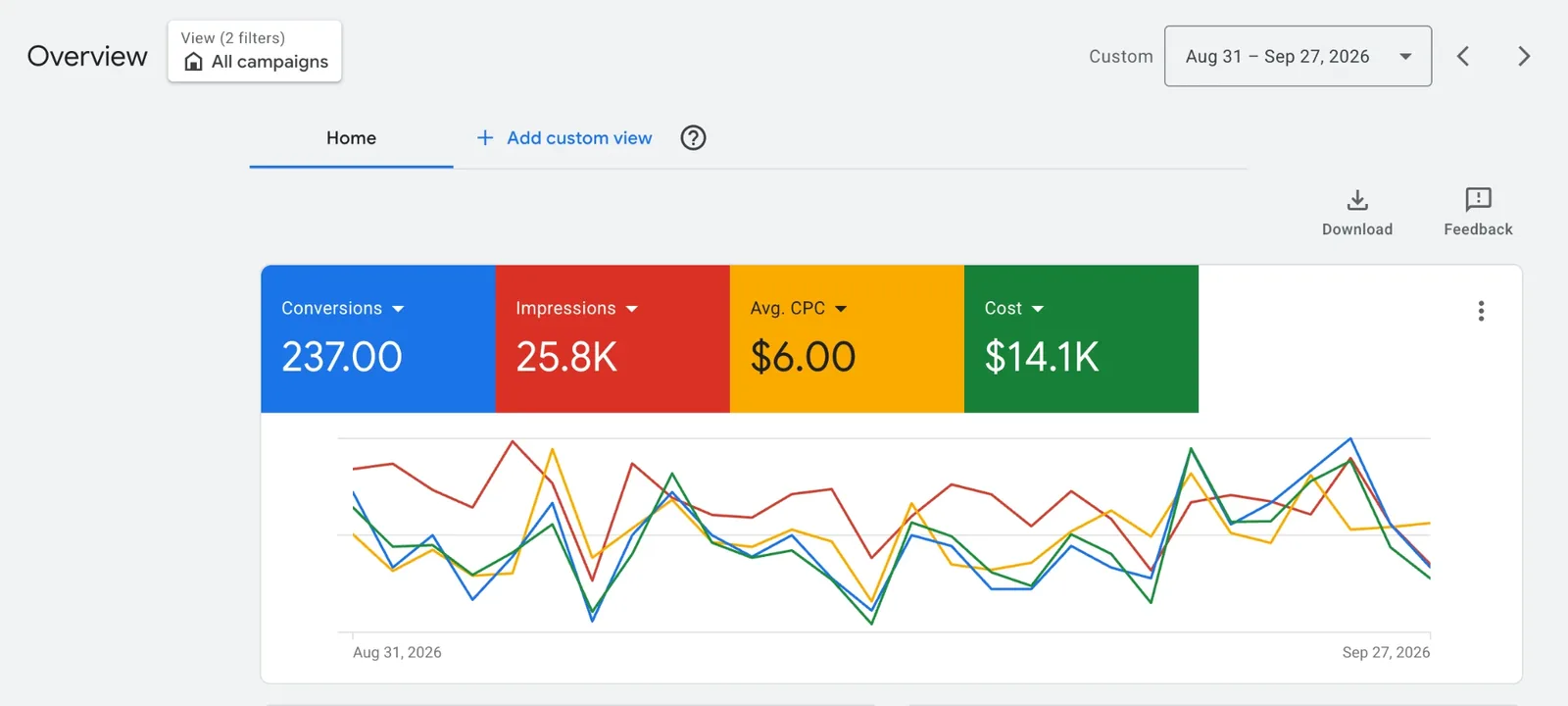
Here's a plumbing client we run Google Ads for, from August 31 to September 27, 2026:
| What | Result |
|---|---|
| Ad spend | $14.1K |
| Calls and forms (conversions) | 237, mostly water heater installs, repipes and sewer work |
| Cost per enquiry | about $60 |
| Average cost per click | $6.00 |
| Work that came out of it | around $300K |
The keywords and bids matter, but the bigger difference is where the ads send people. Every ad goes to a page about that one job, with nothing to click away to, built for the three kinds of visitor: the one who rings straight away, the one who wants to see your jobs first, and the one who reads every review and FAQ. Across the accounts we run, businesses sending ads to a page per job book far more of their enquiries than those sending everything to the homepage. The page rules are further down, and there's more in our plumbing website guide.
Theo walks through this account and the page its ads send people to (5 minutes). Watch on YouTube
If you'd rather have it done for you, see how we work as a plumbing marketing agency.
Local Services Ads first, Search ads for the jobs you choose
Local Services Ads, the badge-carrying listings at the top of searches like "plumber near me," bill per lead and are built from your Business Profile rather than keyword lists. That's why they're often the simplest place to start, though Google verification commonly takes three to four weeks (see our plumber's Local Services Ads playbook).
Search ads charge per click but let you choose the keywords, ad text and landing page for each job. Google's own advice is to run both kinds side by side for more local visibility on Search and Maps. Read how the two ad types compare.
What a plumbing lead can cost and still pay
Start from your own numbers. For reference, leads across the accounts Opus Group runs have averaged $63 over the last twelve months, and your close rate comes from your own job records. Cost per booked job is cost per lead divided by close rate. Example numbers to swap for yours:
- A water heater campaign spends $1,200 and brings 20 leads: $60 each.
- You book 7, a 35% close rate: about $171 in ads per booked job.
- On a $2,400 replacement, that's about 7% of the job.
Flip it for a ceiling per lead: the ad spend you'd accept per booked job times your close rate. Accept $300 a job at 35% and you can pay up to $105 a lead.
The free guide, How a local service business can spend $1,000 and make $60,000 in a month, runs these numbers for Local Services Ads. The guide reaches $60,000 through worked math; it isn't a promise.
Four plumbing ad groups and their keywords
Give each job its own ad group, and research these themes in Keyword Planner, which estimates searches and costs (its keyword ideas need billing details entered):
- Emergency: emergency plumber, burst pipe repair, water leak repair.
- Drains and sewer: drain cleaning, hydro jetting, sewer line replacement.
- Water heaters: water heater replacement, tankless water heater installation.
- Repipes: whole house repipe, galvanized pipe replacement.
For a longer list by job and intent, with match types, see our plumbing Google Ads keyword list.
Match type decides how close a search must be to your keyword. Broad match is the default, typed without symbols, and can catch related searches lacking your keyword's direct meaning; Google calls Smart Bidding critical with it. Phrase match ("water heater replacement") reaches searches that include your keyword's meaning. Exact match ([water heater replacement]) holds to searches sharing its meaning or intent: the most steering, and the fewest searches.
Searches plumbers shouldn't pay for
Example negatives to filter out job seekers, DIYers and parts shoppers:
| Theme | Example negatives |
|---|---|
| Jobs | jobs, career, careers, salary, apprenticeship |
| DIY | diy, how to, yourself, tutorial |
| Parts and training | parts, supply store, wholesale, course, courses |
| Work you don't do | septic, well pump, pool |
By default a negative keyword is broad match: it blocks a search only when all of its words appear, in any order. So water heater parts stops "parts for a gas water heater" yet lets "water heater repair" through. Negative phrase blocks the words in the same order, even with extra words, and negative exact blocks only that exact search. Plurals and synonyms aren't added for you. Watch short words: as negative broad, how to also blocks "how much to replace a water heater."
Check the search terms report weekly for the searches that triggered your ads (Google omits low-volume ones for privacy), and add irrelevant ones as negatives, as Google advises.
Headlines, descriptions and call-ready assets
Give each responsive search ad 3 to 15 headlines (30 characters max) and 2 to 4 descriptions (90 max). Example headlines, with [brackets] for your details:
- "Water Heater Replacement" (24 characters)
- "No Hot Water? Call Today" (24 characters)
- "Water Heaters in [City]" (23 characters)
- "Clogged Drain? Book a Plumber" (29 characters)
- "Whole-House Repipe Estimates" (28 characters)
Example descriptions:
- "Water heater leaking? Tell us the tank size and fuel type, and we'll book a plumber." (84 characters)
- "Planning a repipe in [City]? Schedule an in-home visit for a written estimate." (78 characters)
Add assets (none shows on every impression):
- Call assets put your number on the ad, can be limited to the hours you pick up, and a tap on them costs the same as a headline click. A number typed into the ad text may get the ad disapproved.
- Location assets pull your Business Profile address and can add a map or distance; if your profile hides the address, check how they behave.
- Sitelinks such as "Drain Cleaning" (25 characters, at least 2 needed) cost the same per click as the headline.
- Callouts such as "Tank and Tankless" (25 characters) are free to add.
Where and when your plumbing ads run
Aim at the cities or ZIP codes you serve, or draw a radius (1 km minimum) around your base. Google says tiny targets may show ads only now and then, or not at all. Google's recommended default, "Presence or interest", adds people showing interest in your service area to those who are there or often there. "Presence" drops the interest-based audience, and Google says most campaigns lose impressions once they switch.
Ads run "All day" until you set a schedule, and Smart Bidding respects schedules. If nobody answers at 2 a.m., switch the emergency campaign off overnight; a repipe campaign can run later, since a form can wait. Keep call scripts by the phone.
Where winters freeze, a cold snap can burst pipes, so line up phone cover and budget before one hits.
Measure every call, then pick bids and budgets
- Calls from ads: switch on call reporting and a Google forwarding number reports each call's duration, start time and whether it connected, with calls counted in the default "Calls from ads" conversion action. Tracking only works once a call or location asset carries a verified phone number.
- Website calls: Google's forwarding numbers can replace your site's number for free, counting a call as a conversion once it passes a minimum length you set.
- Forms: Google's URL setup can count thank-you page visits. Keep real leads as primary conversion actions, since bidding optimizes only toward the Conversions column.
- Bidding: Manual CPC sets a maximum per click; Maximize clicks gets the most clicks for your budget. Smart Bidding, including Maximize conversions and Target CPA, depends on conversion tracking; Google suggests judging it over a window with 30 or more conversions, such as a month or more. Keep any Target CPA at or below your ceiling per lead, because since August 17, 2026, budget-limited campaigns perform more consistently toward their target.
- Budget: daily spend can swing up to double your average daily budget, yet for most campaigns the monthly bill tops out at 30.4 times that budget. A $40 daily budget allows up to $80 in a day and $1,216 in a month. A repipe campaign that skips weekends still paces toward 30.4 times its daily budget under Google's June 1, 2026 change, so divide your monthly target by 30.4.
Pages that turn plumbing clicks into calls
Send each ad group to its own job page. Landing page experience, part of Quality Score, is how relevant and useful the page is to people who click. Each page needs:
- A headline that matches the search, such as "Water Heater Replacement in [City]."
- A tap-to-call number in text at the top. If you verify your ad's number through your site, Google requires text, not an image.
- Your real hours, plus photos of your own repipes and sewer work.
For the rest, use our contractor website conversion checklist.
Plumbing Google Ads, city by city
The same playbook plays out differently in each metro: different search volumes, competitors, seasons and licensing rules. Phoenix is a good example. The National Weather Service puts its average at 111 days a year at or above 100°F, and the Valley splits into separate town-name searches, so we run it as several small markets rather than one. Our plumber marketing in Phoenix page shows how that works, and there are local pages for plumbing marketing in Houston, Tampa and Chicago. If you would rather hand the whole thing over, see what our plumber marketing agency service includes.
Google Ads for plumbers: 2026 benchmarks
| Metric | Plumbing benchmark | Opus Group plumbing example |
|---|---|---|
| Cost per click | $10.49 (LocaliQ) | $6.00 average click |
| Conversion rate | 7.63% (LocaliQ) | 237 calls and forms in a month |
| Cost per lead, Search | $129.02 (LocaliQ); $183 non-branded (SearchLight) | ~$60 |
| Cost per lead, Local Services Ads | $57 (SearchLight, Feb 2026) | Run alongside Search |
| Spend and return | — | $14.1K spend, ~$300K of work |
Across the accounts Opus Group runs (all trades), leads average $63, $44–$90 in clients' best months, with a 27x return on ad spend and $1M+ of work won for clients every month.
Sources
- LocaliQ: home services search ad benchmarks (Apr 2024–Mar 2025)
- SearchLight: plumbing Google Ads cost per lead
- SearchLight: LSA cost per lead by trade, 2026
- Google Ads Help: LSA transition to Performance Max
Sources checked 18 October 2026. Third-party figures are national benchmarks, not Opus Group claims.
FAQ
Do Google Ads work for plumbers?Yes, when ads go to a page built for each job and every call is tracked. One plumbing account Opus Group runs turned $14.1K of Google Ads into 237 calls and forms at about $60 each in a month, against a LocaliQ plumbing benchmark of $129.02 a lead.
How much should a plumber spend on Google Ads?
Start with enough to buy 20–40 clicks a day on your best jobs; at LocaliQ's $10.49 plumbing CPC that is roughly $6,000–$12,000 a month in a metro, less in smaller towns. Scale only what books jobs.
Should plumbers run Local Services Ads too?
Usually yes. SearchLight puts plumbing LSA at $57 a lead; Search ads let you target high-value jobs with their own pages.
>Are Google Ads worth it for plumbers?
They can be, when cost per booked job stays small next to the jobs won. Across the accounts Opus Group runs, leads have averaged $63 over the last twelve months.
What results can a plumber get from Google Ads?
In one plumbing account we run, $14.1K of ads brought 237 calls and forms between August 31 and September 27, 2026, about $60 each, mostly water heater installs, repipes and sewer work. Your results depend on your market, the jobs you advertise and how fast you answer.
Can plumbers still create call-only ads?
Google announced that options to create new call-only ads would be removed in February 2026 and that existing ones stop receiving impressions in February 2027. Their replacement is responsive search ads with call assets.
Do I pay when someone calls from my ad?
A tap to call costs a click at your normal CPC; dialing a Google forwarding number by hand costs nothing.
How much should a plumber spend on Google Ads?
Work back from your goal: 10 booked jobs at a 35% close rate need about 29 leads, or about $1,450 a month at $50 a lead, roughly $48 a day.
Opus Group runs Google Ads, Local Services Ads and high-converting landing pages for local service businesses. See how it works.
Opus Group is a plumbing marketing agency working with plumbers across the US, including Chicago, Sacramento, San Diego and Charlotte.
Ready to grow?
Let's talk.
Tell us where you're at and we'll tell you honestly what we'd do. No pressure.
Book your free strategy call →Not ready for a call? Get the free guide first →
Prefer a callback?
Tell us where to reach you and we will call you back within one business day.